Showing posts with label flexible.learning. Show all posts

Sunday, September 14, 2014

Social Media and Cloud Services in the Classroom


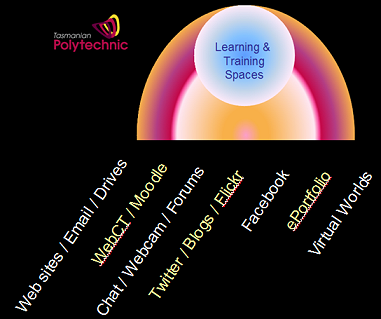
The above snaps are from a great presentation by Tassie educator @anthonycoe on social media in the classroom focussing on engaged learning and effective communication using Socrative, Twitter, Facebook, Google and other SM.

It prompted me to think again about the classroom use of cloud storage through social and mobile services. 5 years ago most education departments, through their own IT Services, managed the risks associated with security, privacy and reliability of online data transfer and storage.

Today teachers and students can choose from a wide range of social and mobile services to enhance learning. What factors should be considered when looking at the cloud storage that these services use? How do we balance the educational opportunities with the appropriate information management controls?

The use of cloud computing is widespread and while most people don't know where their financial, insurance, health, legal or retail data is stored many would trust that the organisations with which they choose to do business follow best practice cloud computing standards and procedures.

Some initial research into cloud services commonly used in schools shows that they are probably suitable from privacy and security points of view for the kind of data commonly being transferred and stored.

 
These cloud computing services employ a number 'best practice' information management procedures and adhere to the European Safe Harbour privacy protection standards:

  • Multi-factor authentication (at least two factor) sign on
  • Encrypted storage
  • Secure transmission
  • Remote wipe (from mobile devices if lost)
What guidelines would help teachers and students make appropriate cloud computing choices for both learning and life?

The transfer and storage of higher risk data that is 'x-in-confidence' (legal, private medical, commercial, research...) needs deeper consideration.

At the end of the day the greatest risk to data privacy and security is probably password management - but that's another post.

Thursday, April 28, 2011

State-wide iPad Management

Click graphic for PowerPoint

Efficient and effective state-wide management of iPads for Health & Wellbeing staff and students has proven to be easier than first thought - with help from a colleague. By using a Gmail account to create an Apple ID it has been possible to provide the required iPad functionality without making management too onerous.

Multiple iPads are set up and updated using the same iTunes account in different regions across the state.

MobileMe provides a service to locate each iPad on Google Maps and to send any iPad a pop-up message, make sound to help in locating it and even lock it from further use if necessary.

DropBox and the DropBox iPad application are used to transfer and share files between the iPads, desktop PCs and with any user on the web with a DropBox account.

Google Reader is used as an RSS aggregator to manage blogs and specialised news feeds which can then be displayed through the Flipboard app on the iPad - along with Twitter lists.

Custom backgrounds are set up on each iPad to assist with identification.

See the iPad Management PowerPoint for more detail.

Saturday, April 16, 2011

Mix'n'Match Learning Environments

Teachers are joining the re-mix culture - in a bold way and at their own pace.

While some are thinking about which LMS the organisation should use from 2012 an increasing number of teachers are customising their own learning environments to suit their personal eLearning journey, learner needs and course requirements.

These teachers no longer feel bound to one system and are exploring different combinations of environments - often challenging themselves to take another step on their journey at a measured pace. In this way they are taking control of their own professional learning and having more say in the provision of ICT services for their learners.

In a surprising number of classes teachers are further customising their mix'n'match learning environments with components or services suggested by their students.
Some mix'n'match examples this year are:

Generally teachers have a learning 'base camp' which is often in a Moodle or Wiki with links from their directly to groups, channels or 'secret urls' in other services. Students are required to manage the different usernames/passwords but this has provided an opportunity to discuss password management systems and Open IDs - something many students are happy to learn about.

More tech-savvy teachers are integrating a range of services back to Moodle - usually through one of the many outside hosting services available which have become easier to use and cheaper.

Many of the above DIY learning environments are used for 'blended learning' and take advantage of student access to mobile computing and home broadband. In fact some components of the mix'n'match combinations are not accessible on campus due to bandwidth or firewall issues. This has not been a significant problem because either these components are optional or students access them through wired, wirelesss or USB broadband at home.

Teachers are also setting up student ICT support models - usually somewhere within the mix'n'match learning environment. For some it's a forum in Mahara, for others discussion pages on a Wiki or a closed group in Facebook. While visiting a class last week I over-heard students designing their own 'help network' independently of the teacher.

One interesting change I've noticed in classes where mix'n'match environments are used is in student attitude and ownership. Students are asking questions about the learning environment and the following discussion is often about learning and learning processes. Students have referred to "our" page/site/group and often come up with suggestions to customise it to make it easier to use.

There is also a new respect for the teacher who is clearly making an effort to construct a useful online learning environment and can be seen at times to be stretching themselves beyond their comfort zones - by choice.


Monday, November 8, 2010

Narrow views of broadband possibilities

Why would you need high-speed broadband in education? That's the question I've been asked a few times over the last couple of months.

At first I had no ready response - I thought it was obvious - clearly it isn't.


The context is the NBN rollout in Australia by 2015 to provide infrastructure that will deliver the bandwidths needed by 2030 and beyond. Tasmania is one of the early 'regions' where work has already begun and the first few towns are now connected. But many are still questioning the expense to the Nation and the need for 100Mbps - particularly for education.


Why do we need high-speed broadband in education?


Current bandwidth (and cost) is so inadequate that schools:
  • restrict bandwidth (shaping) and volume (quotas) for users
  • block rich media sites (for part or all of the day)
  • can't effectively use video (a 2 minute video can take 5 minutes to play)
  • can't use participative media due to tiny upload limits (asymmetric service)
  • have established practices to keep file sizes and internet traffic as small as possible - creating a culture of limitation
  • are limited in the online services they can provide to students off campus
Further discussion with some of those who question the need for high-speed internet connections to schools and homes for learning begins to reveal some deeper implicit assumptions:
  • ICT is an add-on and not required for effective learning
  • the Internet for learning is about email and occasional searching for information
  • most 'content' on the Internet is irrelevant and even harmful for students
  • most students won't use much ICT for further learning or in the workplace - and if they do they will be trained when required

There are many effective ways to use high-speed broadband for learning.

One way to illustrate how current bandwidths stifle learning is to consider video. Video is useful for demonstrations, tutorials, evidence for assessment, communication and story telling. At the moment however any online use of video has to be:

  • short
  • small window size
  • low frame rate
  • low resolution

The use of video becomes counter-productive when you can't clearly see what has been filmed - assuming the video plays without so many pauses that users give up in frustration.

When students produce videos that can be viewed online their work reaches an audience outside classroom walls. This makes the work authentic and meaningful. It raises the students' own expectations for quality and effectiveness. It provides avenues for feedback from and participation with local and global communities.

Video production provides engaging opportunities for learning a wide range of digital media skills. Video production for an external audience makes real for students many other complex issues such as copyright, ethical practice and terms of service. Video production that addresses community challenges such as cyber-bullying or de-forestation help to empower students to be active local and global citizens.

And that's just video. And just the video we know now. 3D video has already arrived in some homes. What bandwidths will we need by 2015 nevermind 2030?

How can we not have high-speed broadband?

What do we do in education until 2015?


Saturday, August 7, 2010

Building a Sustainable Polyverse

How do we build, maintain and innovatively grow a virtual campus that learners, teachers and the community will find easy to navigate, useful and inspiring?

Previous models of ICT provision have focused on a shared services model that provides a walled garden within which learners, teachers and administrators can enjoy reliable, secure and controlled access to computers.


Over the last decade however 'classrooms without walls' have become 'institutions without walls' as learners and teachers became more comfortable using external web services, mobile devices and 3G wireless access on and off campus. Open source solutions hosted on external servers began to appear and have been used by some learning teams (FL & WFS) to provide learning environments and/or services not available from shared ICT services.

More recently learners and staff have increasingly turned to campus libraries (learning centres) for ICT assistance which has become more complex with learners using a larger and more diverse fleet of campus desktops/laptops/netbooks as well as their own mobile devices. In addition learners are utilising a range of external web services and are accessing learning resources almost 24/7.

So... how do we sustainably build and support a coherent virtual campus described in the previous post? Available human resources include
  • Shared ICT Services staff
  • Teaching and support staff
  • Students - as IT trainees, as learners, as content producers
  • External web and hosting services - helpdesks, forums, service contracts

Students are a largely untapped resource. IT students can provide substantial IT helpdesk services in many forms - physical helpdesk, online assistance and library support. Other students are skilled in using specialist applications or services within their course and can offer additional ICT services through a community of practice and/or project-based models. For example creative arts students can produce components required for a virtual world or graphics for an LMS.

In addition students participating collaboratively in different regions of the 'Polyverse' produce digital content that meaningfully adds to available learning and teaching resources.


In order for this new structure to work as an effective, reliable and sustainable whole, new guidelines will be required. Ideally the whole 'Polyverse' would be more than the sum of its parts - a coherent virtual campus with new affordances emerging to support new ways of learning, working and being together.
Whether a student is on a large city campus or isolated in a remote location they should be able to seamlessly access learning resources, equally participate in some aspects of campus life, and hopefully experience a sense of belonging that has been shown to be so important for continued engagement.
Time now to think about the guidelines needed to build and maintain a sustainable 'Polyverse'...

Tuesday, July 27, 2010

Imagining the Polyverse


More thoughts on the virtual campus...

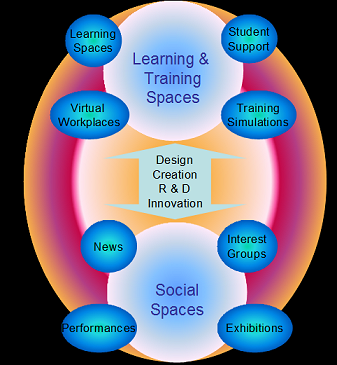
A virtual campus that connects students/teachers/mentors/community and provides opportunities for engaged learning, creative innovation and active citizenship will have

  • learning & training spaces - wide range of supportive learning environments
  • design & innovation hubs - stimulating creativity and facilitating innovative research and development
  • social & professional spaces - social commons, performances and exhibitions
The virtual campus will be designed and built by students/teachers/support staff/mentors/community to nurture and inspire the whole person - physical, mental, emotional and spiritual. Educational processes will enable holistic learning and assessment, encourage self-directed learning and focus on the principles of adult learning for the post year 10 sector.

The virtual campus will

  • organise the online environment for easy navigation
  • provide for learner, teacher and subject centric education as required
  • connect the local to the global, the physical to the virtual, the personal to the institutional
  • be playful and surprising, user created and allow user customisation
  • adapt to change and be proactive with agile development

The virtual campus will be built, serviced and accessed through a diverse range of evolving technologies meeting the needs of learners, teachers and the wider community - a kind of poly-meta-verse or 'polyverse'.


How do we integrate different services to provide users with a coherent and navigable online experience of the polyverse?


How do we build the polyverse so that it is meaningfully and usefully accessible through a range of devices? And in what ways can we blend the physical and virtual environments so that each provides windows and ports to the other?

Tuesday, June 1, 2010

Virtual 'Solutions'?


This presentation attempts to map various (mostly current) ICT services in the Polytechnic that support learning with a view to making some sense of what we might mean by a 'virtual campus' or 'virtual learning environment'.

Can we even talk about a coherent virtual campus? Should we expect to be able to integrate the diverse range of services used by learners and teachers? How do we support legacy systems (and legacy pedagogy?) still used by a significant proportion of users while also supporting clear directions in new ICT services for learning, teaching and assessment?

To what extent do we opt for new 'solutions' when it is clear that they will have a short lifetime in the continuing climate of rapid change and increasing diversity in pedagogy and ICT systems built to meet new needs?

What is the balance between hosting organisational systems with full internal support and providing organisational guidelines for users to choose external services with external support?

What will be the impact of the increasing number of learners using their own ICT devices on campus (sometimes including broadband access) and the emphasis on personalised learning and learner centred approaches - and the high proportion of learners and teachers learning and working from home?

Can organisations provide services that enable more openness - open education resources and open courseware - in a climate of security, ownership and isolation?

Thursday, March 11, 2010

Web 2.0 Exploration


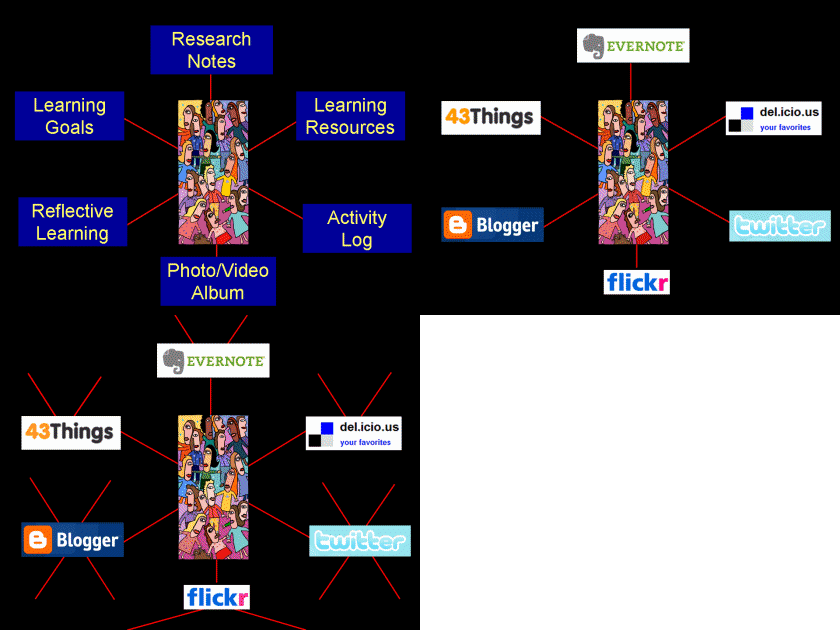
40% of Polytechnic teachers are currently exploring web 2.0 or collaborative web services for learning. Many are using online blogs, photo or video albums for reflective learning or folios for assessment evidence or showcasing work.

The graphic above shows some examples of other web 2.0 services being used by teachers for learning, teaching and assessment. The red lines are indicative of the networks of 'friends' that each service may also bring to the 'classroom' giving an outside audience and increasing the potential for collaboration.

The Flexible Learning Team is now making some recommendations about which particular web service to use for specific learning tasks or desired learning outcomes. This will not only guide those who may be looking for a service to meet their needs but also create a critical mass of users within the organisation that can help each other.

Thursday, February 11, 2010

Enabling a Learning Commons

Click graphic for full size


Polytechnic Libraries and Learning Centres have been evolving for many years and now bear little resemblance to the traditional libraries that many might remember from twenty years ago.
This evolution is continuing as we plan to meet the needs of tomorrow's learners, teachers and other clients. The Polytechnic Corporate Plan (2009-2010) outlines a 'learning commons' philosophy that further integrates learning and support services for students and facilitates the flexible-applied-connected-supported learning agenda.

In addition the State Library and UTas Library are changing to meet client needs. The national Re-Imagining Libraries Strategic Plan is indicative of the directions many libraries are taking:

"In collaboration, the National, State and Territory Libraries of Australia and New Zealand will become leaders in empowering people to create, discover, use and transform our collections, content and global information resources."

These directions require more open and connected ICT services than has previously. The Polytechnic Library Online Services Project team has been mapping the ICT functionality needed to meet the above agenda.

The above graphic (click for full size) maps the ICT functionality to enable:

  • Information and resources to come into the organisation including Open Education Resources, Open Courseware, RSS feeds... (LHS of graphic)
  • Information and resources produced or added to by students and staff within the organisation including Open Education Resources, Open Courseware and RSS feeds to be shared with others (RHS of graphic)
  • Online access by students and staff within the Polytechnic via normal logon (LDAP) or Open ID (bottom of graphic)
  • External access by school students, mentors, local communities... via open unauthenticated access or Open ID (top of graphic)

These needs will now determine the kinds of systems that will be required. Current ICT systems may or may not be sufficient.

Tuesday, June 2, 2009

Re-framing the Present

The current restructuring of Tasmanian public post year 10 education provides a good opportunity to re-conceptualise ICT services to match learning needs. A new ICT network infrastructure has been built from the ground up that supports both legacy and new systems across 16 campuses statewide.

Learning priorities have already been re-framed as the FACS Learning Model - Flexible, Applied, Connected and Supported Learning. In what ways can we re-conceptualise ICT services to enable, facilitate and support the FACS Learning Model?

We have already attempted to map a student perspective on current and planned ICT services, and to map the notion of a Virtual Campus. This post attempts yet another map - starting with learning. The learning priorities on the left are linked to the necessary ICT functionality to support them on the right:


Does it show the important ICT functionality required to enable, facilitate and support FACS Learning?

The next part of this mapping exercise emphasises the need for management processes and tools for the learner, the teacher and the institution .

'Manage MyLearning' is about each learner's need to manage all the processes, artifacts, resources, networks... as they continue their learning journey - particularly as the learner becomes more self-directed.

The teacher needs to manage their teaching processes, resources, classes, students, professional networks... Recently some have done this in a Learning Management System (LMS) - which has really been more of Teaching Management System for most.

'Manage MyInstitution' could be seen as the institutions need to manage facilities, services, staff and students... (Or it might be taking the 'My' trend too far...)

Are there other key roles that should be included here that will inform the provision of ICT services?


The next map shows some of the ICT services that might support learners, teachers and the institution. A brief description of each follows...


Folio & Pathway Management Systems: This is about much more than the provision of efolios. It is about each learner managing their own learning choices, resources, artifacts, networks... on their learning journey (pathway). The learner has control over who can view, access and share their learning resources and artifacts.

Learning Management Systems: This is the standard LMS functionality which is mostly about teacher structures and controls to support learning, teaching and assessment.

Information Management Systems: This is largely about managing and communicating institutional information and resources. Systems such as MOSS have evolved to integrate greater functionality however this requires authenticated access to a closed system.

Learning Environments: These include spaces and structures such as virtual worlds, simulations, serious games, augmented reality... Some of these can integrate resources and functionality from other management systems - eg Sloodle.

Virtual Learning Commons: This is the online component of the 'Learning Commons' that includes additional services to learning resource access such as learning support, client services and exhibition spaces.

Shared Services Management Systems: Finance, Facilities, Human Resources and much more.

Learning and Business Applications & Web Services: Office, specialist and learning tool software and web services. Includes application deployment.

Research & Project Management Systems: This has been somewhat ad-hoc in the past and could evolve to support collaborative innovation and research within and beyond the institution.

Course Management Systems: This could evolve beyond the management of in-house courses to the provision of access to Open Courseware.

What other key ICT services are required to support FACS learning?

Still missing from this mapping exercise are the range of services - including some of the management services above - that exist beyond the institution.


The full map can be seen here.

.

Sunday, May 24, 2009

Measuring Flexible Learning - Breadth and Depth

We are thinking about how to establish benchmarks and measure progress in flexible learning across the Tas Polytechnic - 16 campuses and 1500 teaching staff. But before we can decide on some key performance indicators we need a common and agreed definition of flexible learning.

Flexible learning is often defined as providing learners with choices about where, when, how - and sometimes what - learning occurs. The goal is personalised learning that meets the needs of each and every student - both on and off campus.

The degree of flexible learning that an educational organisation can provide will depend on a range of factors including:

  • learning, teaching and assessment principles and practice
  • facilities and support structures
  • course and learning designs
  • learner engagement and responsibility
  • accountability and quality assurance

Strategies which have been used to increase the level of flexibility in learning include:

  • eLearning and Flexible Delivery
  • Flexible/Open Learning Options
  • Curriculum/Training Package Frameworks
  • Learning Environment/Space Design
  • Professional Learning, Sharing and Collaboration
  • Facilities and Infrastructure for Access and Equity
One objective of the Tasmanian Polytechnic is to "establish flexible learning as part of every teacher's repertoire" - broadening the availability of flexible learning options beyond 'champions', early adopters and specialist areas and deepening the degree of flexible learning beyond the provision of simple content and delivery alternatives.

Flexible learning is not new to the organisation. Many - if not most - teachers already provide some form of choice for learners and there are numerous examples of individuals, teams and learning areas that provide very effective and innovative options for personalised learning, learning spaces and learner support. We need to learn from these and 'mainstream' them.

There are many examples of flexible 'elearning' including some that not only offer content, delivery and communication choices but go deeper to collaboration, reflective assessment and blended learning.

The Australian Flexible Learning Framework suggests a range of elearning indicators that we could adapt for measuring flexible learning. A number of these could use data that is already being collected to establish some early benchmarking.

Does anyone know of any other measures or KPI lists for flexible learning in that go beyond superficial adoption of ICTs?
.

Monday, March 9, 2009

Learning Technology Surprises

There were a few surprises in last week's survey of just over 2,000 Polytechnic staff.

10% responded to the survey and most did so in the first day.


Full Size

For me some of the surprises were:

  • 61% of staff access ICT for their work from home
  • 77% have used Google Earth
  • 45% use Facebook
  • 24% have used computer games with students
  • 60% use mentoring/coaching with students
  • 61% use self/peer assessment with students

The requests and comments at the end of the survey highlighted several issues for staff including the need for efficient and effective communication and dialogue across multiple campuses. This will be covered in the next post.

.

Monday, December 15, 2008

Can Flexible Learning be Agile?

The book Leadership Agility (Joiner & Josephs, 2007) makes the point that today’s managers/leaders need to be more than flexible and adaptable in rapidly changing environments. They need to be agile.

Agility is about being proactive, making strategic choices, developing collaborative partnerships, making the most of sudden opportunities… with a clear direction and purpose in mind.

After my previous post I wondered if flexible learning helps to develop ‘agile’ learners… And to what extent is the provision for flexible learning itself proactive? Is flexible learning mostly about playing ‘catch-up’?

Much is written about learning, teaching and assessment being responsive to students, being responsive to business/industry, being responsive to changes in technology… being flexible… But are there proactive as well as reactive elements to ‘flexible learning’? Do we need to talk about ‘agile learning’?

I think we already know about proactive forms of flexible learning. We have action research, action inquiry, self-directed inquiry… We have transformative learning, futures learning…


Have we integrated these more proactive elements of learning into our conception and implementation of ‘flexible learning’? What would flexible learning look like and feel like if it was both responsive and proactive?

Sunday, December 14, 2008

Flexible Learning - Mapping the Territory

Click for expanded view

Learning in the new Tasmanian Polytechnic will be "flexible" - but what does that mean?

Principally it's about being 'learner centered'. Learning needs to be responsive to students - most of whom are adult or near-adult learners. Learning must cater for the needs and interests of learners and the differences between learners in areas such as learning styles, culture, gender and current life circumstance.

But learning also needs to be responsive to the needs of business and industry who require learning to be available in appropriate places, times and forms. Learning must adapt to provide the skills required where there are shortfalls - and for new industries. Higher-level skills in thinking, innovation and collaboration are also required.

And there is a bigger picture. Learning needs to be responsive to global change - environmental, economic, technological, cultural... Sustainable, productive and purposeful lifestyles can no longer be lived in isolation from global events.

To achieve the above in the Tasmanian Polytechnic learning needs to be personalised. Learners need choice and control over the time, place, content and products of their learning. Learners need to have their existing knowledge and skills recognised - and any missing essential learning identified and supported.

Learning, teaching and assessment principles need to be based on contemporary educational research and underpinned by 21st century worldviews. Structures to support learning need to be adaptive and fit for purpose.

Hmmm... no problem - we know how to do most of this. Well we can map some of it... and see what others have done...
We just need to coordinate educational provision across a large state-wide organisation in such a way that it can change and grow while setting up structures and processes to support flexible learning :-)

Thursday, December 11, 2008

Flexible Learning - Asking the right questions...


What are the needs of learners in the new state-wide post-year 10 Tasmanian Polytechnic? Before jumping to possible answers - and just as quickly to tools and strategies - it might pay to take some time to ask more questions...

As Jamie McKenzie says: "The question IS the answer."


Who are the learners?

Students as learners - full-time, part-time, on campus, remote, Gen Y, Gen X, whole-person - with current competence and new goals

Staff as learners - teachers, support staff, mentors and leaders/managers - with expertise and new challenges

Organisation as learner - the Tasmania Polytechnic is a new institution - with much to learn and many relationships to build.


What kind of learning?

Adult Learning - in the Tasmanian Polytechnic students and staff are young-adult and adult learners - they require choice, personalised learning, self-directed learning and support for transformative learning.

Quality Education - applied learning, connected learning, supported learning and flexible learning - for students, staff and the organisation as a whole.

Futures Focus - new jobs, global challenges, creativity and innovation for the 21st century.

How will relationships be formed?

Building Identity - social and professional for students/staff/organisation - face-to-face and online.

Communities of Practice - work, inquiry, special interest - physical, augmented and virtual spaces.

Folios and Workspaces - individual, group, learning commons - for working and showcasing.

Finding Voice - active citizenship, advocacy and leadership for students/staff/organisation at local, national and global levels - through face-to-face, traditional and online media.


Where will learning happen?

Blended Learning - Informal, classroom, workplace, home, simulated, virtual, play, distance...
Learning, Teaching and Assessment - values, principles, journeys, desired outcomes...

Communication - information, consultation, collaboration, co-construction.

Evaluation - benchmarks, research (quantitative, action research, research partnerships...), publication/presentation/celebration.


What other questions should we be asking before we look at ways in which we might facilitate flexible learning in this new institution?

.