Showing posts with label ICT. Show all posts

Friday, January 13, 2017

Social Technologies Data Flow - Photos and Graphics

Click to enlarge
Photos and graphics is the final topic in this series of data flow / systems diagrams for our Department of Education social technologies services.

Photos and graphics are captured or designed from a wide variety of sources using many devices.

Editing is done through the Adobe Creative Suite for desktop and mobile - plus a wide range of other apps - increasingly on mobile devices.

Photos and graphics are processed, tagged, checked for permission to publish and licensed using the AusGOAL Creative Commons copyright licencing framework.

It is hoped that AI deep learning technology will take over some of the burden of tagging and searching thousands of images in our libraries over the next couple of years (eg automatic image tagging in iPhotos, flickr, Facebook, Google images which has developed rapidly since 2015).

Photos and graphics are published in both traditional media and social media.

Dropbox is frequently used to move digital assets between apps and devices. An increasing number of images are taken and edited on mobile devices and shared to social media.

Different photo libraries are maintained in Adobe Creative Cloud, Dropbox, flickr and Google photos for different purposes and audiences.

Interactive panorama require specialist software and hosting.


This post is part 6 of a series illustrating Data Flow for some Department social technologies:
  1. Social Technologies Data Flow - Facebook
  2. Social Technologies Data Flow - Instagram and Twitter
  3. Social Technologies Data Flow - Google+
  4. Social Technologies Data Flow - Video
  5. Social Technologies Data Flow - Mobile Apps
  6. Social Technologies Data Flow - Photos/Graphics


Friday, January 6, 2017

Social Technologies Data Flow - Video

Click graphic to enlarge

The production and viewing of video content has increased in volume and complexity across the Department over the last 3 years. Offline and online HD video is captured through a range of devices including mobile devices and web cams. This creates large (100's GB) files that need to be moved, stored, shared and processed.

External contractors produce some video which is usually shared during production using Dropbox and Vimeo. Finished products are generally uploaded (MP4) to Vimeo or YouTube.

In-house production of short clips for social media channels is increasingly done on mobile devices using a range of video apps such as iMovie. Longer videos are edited using Camtasia Studio on desktops. Geographically dispersed production teams share video files (MP4) via Dropbox and Vimeo.

Vimeo is used to provide a library of Department stock video for use in future productions.

Creative Commons background music and sound effects are generally used and the final video is generally uploaded as Creative Commons BY 4.0 specifying any exceptions such as logos or partner content.

The Amara captioning service linked to Vimeo is often used to produce SRT files that are uploaded to Vimeo or YouTube after editing. Sometimes captions are burnt into the video using Camtasia Studio.

Some videos are uploaded to Facebook rather than share a link from YouTube.

Panopto is used to produce screen casts. Screencasts are also produced using the Camtasia Studio PowerPoint add-in which then allows advanced features to be added. Video can also be exported from Panopto to Camtasia Studio for advanced editing.

uQR.me is used to generate and manage dynamic QR codes to link to videos from printed resources or from labels on objects in learning environments.

2017 challenges
  • Live video casting from Facebook, Twitter and other services is increasing. We will need to consider best practice information management procedures.
  • Longer videos require greater processing power. SSD technology is being considered for 2017.
  • Terabytes of video archives are currently stored in external hard drives across the organisation. These need to be better managed.


This post is part 4 of a series illustrating Data Flow for some Department social technologies:
  1. Social Technologies Data Flow - Facebook
  2. Social Technologies Data Flow - Instagram and Twitter
  3. Social Technologies Data Flow - Google+
  4. Social Technologies Data Flow - Video
  5. Social Technologies Data Flow - Mobile Apps
  6. Social Technologies Data Flow - Photos/Graphics

Saturday, February 27, 2016

Next Gen Government - Day 2 Takeaways

A small edit to the Waterforms International Water Vortex while waiting for departure at Canberra Airport. Somehow it feels appropriate for this post... See quote at the end.
These are some random thoughts I'm taking away from the second day of sessions at #NexGenGov in Canberra. These mostly relate to our current Department issues/projects rather than a comprehensive report on what was said - or who said it.

Innovate on service delivery not technology. 

Focus on customer events, circumstances, their journey...
Identify services with the highest impact. 

For many external clients (and even staff) your website 'landing page' is the Google search results page. 

The Department has Google+ pages for all schools and this has been very effective.
How might we influence/customise Google search results for the Department's main public online web and other online spaces? How could we use Google Ads and APIs?

Does current navigation make sense to the user when they drop deep within our website/CMS from an external search engine?
Need for a rethink...

The 'Internet of Your Things' offer opportunities to rethink aspects of service delivery.

Young people (including young adults) do not generally go to a government website for help.

How do we reach out to this group? Go to the platforms and places used by your intended audience.
Social media? Which platforms are being used by your intended audience? What value can you bring?

Gamification? Mobile Apps?  See Party for Your Rights.

The notion of a 'one stop shop' may become the 'one stop pop-up shop'.

Proactive Organisation - provides a product or service when it is needed rather then after it has been requested... 

Innovation SPRINT - 10 days - Discover, Define, Develop Ideas, Deliver Alpha.
Trans-departmental teams, design thinking, blue-sky thinking by 'digital natives'.
Leave space in thinking, processes and solutions/products for innovation.

Drive rapid iteration.

Overcome the fear of failure - "fail fast, fail cheaply".

3 steps to making 'good mistakes'
1. making mistakes after due care and attention
2. acknowledging mistakes
3. not repeating mistakes

Common current drivers are fear and hope - fear of disruption/disconnection/disengagement - hope for transformation.

Launch Alpha to selected audiences - even public- and then move to 'perpetual beta' or launch Beta and then move to ongoing interative development.

Gartner predicts 75% of digital organisations will 'build' not 'buy' by 2020.

See the US Digital Services Playbook - "Today, too many of our digital services projects do not work well, are delivered late, or are over budget. To increase the success rate of these projects, the U.S. Government needs a new approach. We created a playbook of 13 key “plays”...  "

Social Media

Think about archiving social media - have information management policy/procedures for social media. Think about minimum meta tags for social media.


See national Digital Continuity 2020 Policy and actions/dates.

Open Source, Open Data, Open Culture, Open Government

Open source is about much more than software. 
Tasmania has a new Open Data Policy

In what ways are we benefitting from and contributing to the staten national and globalopen agenda?
During 2016 the Department will be seeping its adoption of Creative Commons Licensing. How might this facilitate a more open culture and enable changes in service delivery?

AI, natural language and the user interface

How far away is a Siri/Cortana user interface for organisations?
"What can I help you with?"

Digital Identity and Authentication

Biometrics is delivering higher confidence authentication

One identity and login for multiple government services...

Watch MyGov, MyTax, My Health Record over the next few months and years...

Google ID, Apple ID, Facebook Connect... are already international IDs and logins.

Blocks to innovation and faster development.

A focus on fully tested perfect solutions delivered years into the future.

A focus on how to monetise assets rather than what we can do that's best for citizens/clients.

Being risk averse about privacy and security issues rather than using 'Privacy by Design' principles, getting it right, and then moving on. 

"Silicon Valley is a state of mind not a place."

Jack Welch

“If the rate of change on the outside exceeds the rate of change on the inside, the end is near.” ― Jack Welch


Sunday, August 30, 2015

Where to from here? A wicked problem

A great deal has changed in the ICT space for our schools over the last two years - the rise of social and mobile media, the use of cloud services for the effective and efficient delivery of agile infrastructure, and the interest and influence of large national and multinational companies - to name a few.

At the same time there's been a more gradual but just as profound change in society and culture as a result of the pervasive and often invisible ICTs. The trends and expectations I see in my role can be summarised as follows.


New approaches are required. This challenge has the characteristics of a ‘wicked problem’.

It is a moving target and is socially complex. It involves changing values and new behaviours.

It challenges current boundaries and policies, questions assumptions, and there may be no single ‘solution’.

 
To understand wicked problems I like the analogy of playing a ball game.

You are focussed on the ball and reaching the goals...
You build personal and team skills and become strategic.

Then the goals move - but you are not distracted and remain focussed on the ball...

You sense the ground shaking under your feet - but you skilfully adapt and approach the goals.

You kick a brilliant goal and raise your arms! But all is quiet...

As you look around you notice that half the players have gone...
The stadiums are largely empty.

The crowd are watching a new game being played on a different field some distance away.


The use and support of digital media for education is a wicked problem.

Photo: Creative Commons - Wikimedia

Saturday, August 29, 2015

Social Media Use Snowballing


In my current digital media role it has become apparent that existing support models for our digital media channels are no longer sustainable – or even desirable in some cases.

The uptake of social media for example has been dramatic - a 1,000% increase in official Facebook use in a little over two years. And that's just Facebook.
Key changes over the last couple of years include:
  • Decreased access to public websites
  • Increased use of and dependency on, school intranets
  • Dramatic increase in the use of social and mobile media
  • Increased public expectation that Google search should provide basic contact information
  • Increased disatisfaction with PDF newsletter access on mobiles


Website access is moving from desktop to mobile and public access to websites has dwindled.
This pie chart from last year gives a graphic view of the public access to different online department information channels. School satisfaction with traditional public websites has dropped to 45% while satisfaction with public Facebook pages is 90%.

During school closures earlier this month more than 80% of public access to updates was via mobile devices. There were nearly half a million views across school Facebook pages and the official school closure blog in 3 days.

Average monthly views of official public Facebook posts across the department are approaching 1,000,000. YouTube video views have more than tripled over the last two years.

In what ways do we need to change support models to accommodate these rapid shifts?
How much time and effort should we spend on traditional websites?

Website analytics indicate only a small percentage of our information is regularly accessed.
What are the new purposes and audiences for traditional websites?

Do we need to revisit our social media risk management processes and resourcing?

Do we need to question some of our fundamental assumptions about how we resource online digital media?

What new opportunities are there with a communication channel that has one million views a month?

Sunday, November 16, 2014

Risk and Opportunity in Cloud Services

Finding an optimal balance between the risks and opportunities of cloud services and storage can be challenging. Risk associated with information security, privacy and sovereignty must be considered as well as the opportunities for access to engaged learning, cost savings and agile development.

The Tasmanian Information Security Policy Manual outlines a framework based on a risk management approach that requires government agencies to implement policies and procedures that are proportionate to the level of risk.

A Guide to Implementing Cloud Services: Better Practice Guide shows how appropriate risk mitigation strategies can protect data according to its level of security classification.

Advice such as Cloud Computing Myths address some misconceptions which can lead to a loss of opportunity if information management is unnecessarily restrictive.

The challenge then, is to use cloud services that are optimal for the security classification of the data in question while maximising the opportunities afforded by cloud services.

 
Locking all education data into computing services and storage that are best suited to 'x-in-confidence' information is expensive, restrictive and reduces the possibilities for innovation in the provision of IT services for learning.
 
On the other hand storing 'x-in-confidence' data in social media services can be high risk.
 
The following mapping is a little simplistic but it shows how there could be room to choose 'best practice' third party cloud storage as well as social and mobile media where the terms of service are sufficient to meet needs.
 
 
By selecting the appropriate storage for each level of information security required we can make the most of the opportunities that cloud computing services bring while carefully managing the risks.
 
This risk management also includes best practice password management.


Sunday, September 14, 2014

Social Media and Cloud Services in the Classroom


The above snaps are from a great presentation by Tassie educator @anthonycoe on social media in the classroom focussing on engaged learning and effective communication using Socrative, Twitter, Facebook, Google and other SM.

It prompted me to think again about the classroom use of cloud storage through social and mobile services. 5 years ago most education departments, through their own IT Services, managed the risks associated with security, privacy and reliability of online data transfer and storage.

Today teachers and students can choose from a wide range of social and mobile services to enhance learning. What factors should be considered when looking at the cloud storage that these services use? How do we balance the educational opportunities with the appropriate information management controls?

The use of cloud computing is widespread and while most people don't know where their financial, insurance, health, legal or retail data is stored many would trust that the organisations with which they choose to do business follow best practice cloud computing standards and procedures.

Some initial research into cloud services commonly used in schools shows that they are probably suitable from privacy and security points of view for the kind of data commonly being transferred and stored.

 
These cloud computing services employ a number 'best practice' information management procedures and adhere to the European Safe Harbour privacy protection standards:

  • Multi-factor authentication (at least two factor) sign on
  • Encrypted storage
  • Secure transmission
  • Remote wipe (from mobile devices if lost)
What guidelines would help teachers and students make appropriate cloud computing choices for both learning and life?

The transfer and storage of higher risk data that is 'x-in-confidence' (legal, private medical, commercial, research...) needs deeper consideration.

At the end of the day the greatest risk to data privacy and security is probably password management - but that's another post.

Monday, November 8, 2010

Narrow views of broadband possibilities

Why would you need high-speed broadband in education? That's the question I've been asked a few times over the last couple of months.

At first I had no ready response - I thought it was obvious - clearly it isn't.


The context is the NBN rollout in Australia by 2015 to provide infrastructure that will deliver the bandwidths needed by 2030 and beyond. Tasmania is one of the early 'regions' where work has already begun and the first few towns are now connected. But many are still questioning the expense to the Nation and the need for 100Mbps - particularly for education.


Why do we need high-speed broadband in education?


Current bandwidth (and cost) is so inadequate that schools:
  • restrict bandwidth (shaping) and volume (quotas) for users
  • block rich media sites (for part or all of the day)
  • can't effectively use video (a 2 minute video can take 5 minutes to play)
  • can't use participative media due to tiny upload limits (asymmetric service)
  • have established practices to keep file sizes and internet traffic as small as possible - creating a culture of limitation
  • are limited in the online services they can provide to students off campus
Further discussion with some of those who question the need for high-speed internet connections to schools and homes for learning begins to reveal some deeper implicit assumptions:
  • ICT is an add-on and not required for effective learning
  • the Internet for learning is about email and occasional searching for information
  • most 'content' on the Internet is irrelevant and even harmful for students
  • most students won't use much ICT for further learning or in the workplace - and if they do they will be trained when required

There are many effective ways to use high-speed broadband for learning.

One way to illustrate how current bandwidths stifle learning is to consider video. Video is useful for demonstrations, tutorials, evidence for assessment, communication and story telling. At the moment however any online use of video has to be:

  • short
  • small window size
  • low frame rate
  • low resolution

The use of video becomes counter-productive when you can't clearly see what has been filmed - assuming the video plays without so many pauses that users give up in frustration.

When students produce videos that can be viewed online their work reaches an audience outside classroom walls. This makes the work authentic and meaningful. It raises the students' own expectations for quality and effectiveness. It provides avenues for feedback from and participation with local and global communities.

Video production provides engaging opportunities for learning a wide range of digital media skills. Video production for an external audience makes real for students many other complex issues such as copyright, ethical practice and terms of service. Video production that addresses community challenges such as cyber-bullying or de-forestation help to empower students to be active local and global citizens.

And that's just video. And just the video we know now. 3D video has already arrived in some homes. What bandwidths will we need by 2015 nevermind 2030?

How can we not have high-speed broadband?

What do we do in education until 2015?


Tuesday, June 1, 2010

Virtual 'Solutions'?


This presentation attempts to map various (mostly current) ICT services in the Polytechnic that support learning with a view to making some sense of what we might mean by a 'virtual campus' or 'virtual learning environment'.

Can we even talk about a coherent virtual campus? Should we expect to be able to integrate the diverse range of services used by learners and teachers? How do we support legacy systems (and legacy pedagogy?) still used by a significant proportion of users while also supporting clear directions in new ICT services for learning, teaching and assessment?

To what extent do we opt for new 'solutions' when it is clear that they will have a short lifetime in the continuing climate of rapid change and increasing diversity in pedagogy and ICT systems built to meet new needs?

What is the balance between hosting organisational systems with full internal support and providing organisational guidelines for users to choose external services with external support?

What will be the impact of the increasing number of learners using their own ICT devices on campus (sometimes including broadband access) and the emphasis on personalised learning and learner centred approaches - and the high proportion of learners and teachers learning and working from home?

Can organisations provide services that enable more openness - open education resources and open courseware - in a climate of security, ownership and isolation?

Thursday, March 11, 2010

Web 2.0 Exploration


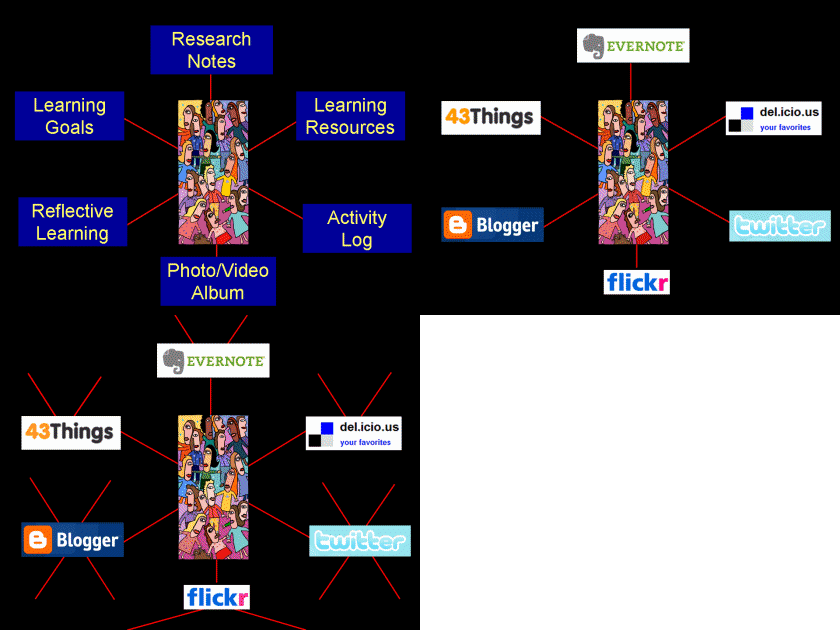
40% of Polytechnic teachers are currently exploring web 2.0 or collaborative web services for learning. Many are using online blogs, photo or video albums for reflective learning or folios for assessment evidence or showcasing work.

The graphic above shows some examples of other web 2.0 services being used by teachers for learning, teaching and assessment. The red lines are indicative of the networks of 'friends' that each service may also bring to the 'classroom' giving an outside audience and increasing the potential for collaboration.

The Flexible Learning Team is now making some recommendations about which particular web service to use for specific learning tasks or desired learning outcomes. This will not only guide those who may be looking for a service to meet their needs but also create a critical mass of users within the organisation that can help each other.

Thursday, February 11, 2010

Enabling a Learning Commons

Click graphic for full size


Polytechnic Libraries and Learning Centres have been evolving for many years and now bear little resemblance to the traditional libraries that many might remember from twenty years ago.
This evolution is continuing as we plan to meet the needs of tomorrow's learners, teachers and other clients. The Polytechnic Corporate Plan (2009-2010) outlines a 'learning commons' philosophy that further integrates learning and support services for students and facilitates the flexible-applied-connected-supported learning agenda.

In addition the State Library and UTas Library are changing to meet client needs. The national Re-Imagining Libraries Strategic Plan is indicative of the directions many libraries are taking:

"In collaboration, the National, State and Territory Libraries of Australia and New Zealand will become leaders in empowering people to create, discover, use and transform our collections, content and global information resources."

These directions require more open and connected ICT services than has previously. The Polytechnic Library Online Services Project team has been mapping the ICT functionality needed to meet the above agenda.

The above graphic (click for full size) maps the ICT functionality to enable:

  • Information and resources to come into the organisation including Open Education Resources, Open Courseware, RSS feeds... (LHS of graphic)
  • Information and resources produced or added to by students and staff within the organisation including Open Education Resources, Open Courseware and RSS feeds to be shared with others (RHS of graphic)
  • Online access by students and staff within the Polytechnic via normal logon (LDAP) or Open ID (bottom of graphic)
  • External access by school students, mentors, local communities... via open unauthenticated access or Open ID (top of graphic)

These needs will now determine the kinds of systems that will be required. Current ICT systems may or may not be sufficient.

Tuesday, June 2, 2009

Re-framing the Present

The current restructuring of Tasmanian public post year 10 education provides a good opportunity to re-conceptualise ICT services to match learning needs. A new ICT network infrastructure has been built from the ground up that supports both legacy and new systems across 16 campuses statewide.

Learning priorities have already been re-framed as the FACS Learning Model - Flexible, Applied, Connected and Supported Learning. In what ways can we re-conceptualise ICT services to enable, facilitate and support the FACS Learning Model?

We have already attempted to map a student perspective on current and planned ICT services, and to map the notion of a Virtual Campus. This post attempts yet another map - starting with learning. The learning priorities on the left are linked to the necessary ICT functionality to support them on the right:


Does it show the important ICT functionality required to enable, facilitate and support FACS Learning?

The next part of this mapping exercise emphasises the need for management processes and tools for the learner, the teacher and the institution .

'Manage MyLearning' is about each learner's need to manage all the processes, artifacts, resources, networks... as they continue their learning journey - particularly as the learner becomes more self-directed.

The teacher needs to manage their teaching processes, resources, classes, students, professional networks... Recently some have done this in a Learning Management System (LMS) - which has really been more of Teaching Management System for most.

'Manage MyInstitution' could be seen as the institutions need to manage facilities, services, staff and students... (Or it might be taking the 'My' trend too far...)

Are there other key roles that should be included here that will inform the provision of ICT services?


The next map shows some of the ICT services that might support learners, teachers and the institution. A brief description of each follows...


Folio & Pathway Management Systems: This is about much more than the provision of efolios. It is about each learner managing their own learning choices, resources, artifacts, networks... on their learning journey (pathway). The learner has control over who can view, access and share their learning resources and artifacts.

Learning Management Systems: This is the standard LMS functionality which is mostly about teacher structures and controls to support learning, teaching and assessment.

Information Management Systems: This is largely about managing and communicating institutional information and resources. Systems such as MOSS have evolved to integrate greater functionality however this requires authenticated access to a closed system.

Learning Environments: These include spaces and structures such as virtual worlds, simulations, serious games, augmented reality... Some of these can integrate resources and functionality from other management systems - eg Sloodle.

Virtual Learning Commons: This is the online component of the 'Learning Commons' that includes additional services to learning resource access such as learning support, client services and exhibition spaces.

Shared Services Management Systems: Finance, Facilities, Human Resources and much more.

Learning and Business Applications & Web Services: Office, specialist and learning tool software and web services. Includes application deployment.

Research & Project Management Systems: This has been somewhat ad-hoc in the past and could evolve to support collaborative innovation and research within and beyond the institution.

Course Management Systems: This could evolve beyond the management of in-house courses to the provision of access to Open Courseware.

What other key ICT services are required to support FACS learning?

Still missing from this mapping exercise are the range of services - including some of the management services above - that exist beyond the institution.


The full map can be seen here.

.

Monday, May 25, 2009

eFolios for Learning and Life

This year we are "establishing and implementing a Polytechnic ePortfolio strategy" across all campuses. A significant part of this work will be informed by a 2009 E-Learning Innovations Project 'E-portfolios are 'living' evidence' supported by the Australian Flexible learning Framework.

This project focuses on using efolios (Mahara) as an integral part of the learning process - a process described in the 2008 JISC report as 'e-portfolio-based learning'. Last week saw the first orientation session into Mahara for the group involved in this project.

Graeme and I presented some background information on folios and learning processes and we spent some time playing with Mahara - uploading artifacts, setting profiles, linking with 'friends' and creating views.

Unfortunately the laptop links through a hub failed only worked for a couple of people so we had to resort to external broadband wireless connections through mobiles phones and pre-paid USB modems. Fortunately we were able to get a surprising number working.
I've decided I love my ultra-notebook and pre-paid broadband. No more worries about being able to connect at different locations and no more firewall hassles - I use Telstra services... I can load all my own applications - and they work as expected.

At 1kg the ultra is great to carry around - my laptop is 3.5kg and more when it's in its bag.

I've notice a few other staff going down this path as well - and some students. But I digress...

Here are some of the slides we presented during the day:


Uploaded on authorSTREAM by regor2012

The efolio project is part of a bigger picture of the range of ICT services used by learners - how and where and when they access them - and who provides them. The 'bigger picture' for the new Tasmanian Polytechnic is about flexible, connected, applied and supported learning which can be enabled and/or enriched through
  • efolios
  • portals
  • LMSs
  • virtual worlds
  • augmented reality
  • serious games
  • communication and collaboration environments
  • media channels
  • galleries
  • open courses
  • learning commons
More on these later...


Last Thursday I attended an RMIT 'roundtable' on efolios and RPL. It was very useful - partly because we heard that we have been doing what everyone else is doing and partly because I made links with several institutions that are using Mahara. I also got to meet Alison Miller after following her for a couple of years on Twitter and journals. She provides a great channel to what is going on in the efolio world - and other things.

Towards the end we started to talk about the broader use of efolios for learning and life. This is definitely a conversation to continue in the near future.

Monday, March 9, 2009

Learning Technology Surprises

There were a few surprises in last week's survey of just over 2,000 Polytechnic staff.

10% responded to the survey and most did so in the first day.


Full Size

For me some of the surprises were:

  • 61% of staff access ICT for their work from home
  • 77% have used Google Earth
  • 45% use Facebook
  • 24% have used computer games with students
  • 60% use mentoring/coaching with students
  • 61% use self/peer assessment with students

The requests and comments at the end of the survey highlighted several issues for staff including the need for efficient and effective communication and dialogue across multiple campuses. This will be covered in the next post.

.

Sunday, February 15, 2009

Blended Campus Tour

Here is a Google Earth Tour that you can download (unzip and open in Google Earth) that visits each campus in the Tasmanian Polytechnic for 2009 - including our vitual world locations in Second Life.

Or you can watch the video of the tour below - it includes scenes from Island Campus and Jokaydia Campus in Second Life. The Jokadia Campus has been cleared of last year's projects in readiness for 2009 - although there is a crocodile by the water... and look out for some some seals and a turtle just off shore.

If you have an avatar come and visit... here is the Jokaydia SLURL.

Second Life has many educational uses and some large international educational communities. A number of flexible learning projects will use Second Life in 2009 that were planned and tested in 2008.

Students over 18 will be using Jokaydia and the Polytechnic Island while those under 18 years of age will use Skoolaborate - a secure virtual world used by schools and colleges in the Asia-Pacific region.

Click to play - and watch the high quality version - link under video.

Friday, December 5, 2008

Polly Waffle

The shape and size of the new Tasmanian Polytechnic emerged as a whole for the first time yesterday as we filled the Tailrace Convention Centre in Launceston.

CEO Belinda McLennan and a bevvy of Directors introduced themselves and their vision for the new post secondary educational institution for Tasmania. Much was said but for me some of the points that stuck in my mind were:

Challenging existing paradigms and cultures
This is possibly the biggest challenge of any organisational change - the more things change the more they stay the same. We are involved in a significant systemic change and while we may solve the logistical challenges unless we question our worldviews, assumptions and values little will change for students. While many are frustrated with the present lack of clarity in the roles, structures and processes of the emerging Polytechnic I see this as a positive sign that the nature of systemic change is well understood by those currently leading it.

Consultation - Collaboration - Co-construction
Several Directors spoke of entering a new phase of change now - one where the processes are more collaborative than consultative for most staff. As this happens more people are likely to begin to explore the possibilities and hopefully co-construct new ways to meet the educational needs of students and the community.

Applied, Supported, Connected and Flexible - Learning, Teaching and Assessment
It was good to hear new educational metaphors as Belinda and other Directors speak of connected learning and learning ecologies. This language and its underpinning 20th/21st century worldviews are essential if we are to move from an educational system founded on 16th-19th century materialism and reductionism.

Belinda also asked that we adopt a futures perspective and consider for example the jobs that are yet to be invented - or indeed have just been invented - that lead us forward into healthy, creative and sustainable lives at a time with many global challenges. I think this futures perspective deserves further exploration: How can we help students develop skills in problem prevention and problem posing as well as problem solving? How can we ensure social foresight informs our thinking and actions?

Adult Learners and Adult Learning
Ron Nash reminded us that we are dealing with adult or near-adult learners and that we now know much more about how adults learn and the flexibility and support that they require. We also need to address transformative learning which is a key element of adult learning that is being addressed in many leading tertiary educational institutions.

ICTs and Learning, Teaching and Assessment
Belinda noted the need for Web 2.0 and LMS technologies to enable and support learners and teachers in the new institution - something that resonated with me since it has been an important aspect of my work over the last few years. Of course I would add Web 3.0 - not that everyone needs a 'second life' but it has become clear that there are significant learning and employment opportunities in virtual worlds and serious games that are just starting to being realised.
Someone with a sense of humour convinced the organisers to give out Polly Waffles as we left - a treat and a challenge!

.