Saturday, April 24, 2010

Playing TAG

Many staff and students are using web services for displaying, organising and sharing their work. A number of Creative Arts teachers have been looking at how work might be tagged within these services so that staff and students can search for products created

  • by Tasmanian Polytechnic students and staff
  • in the same course or qualification
  • on the same campus
  • using the same media

In addition to facilitating searching a state-wide tagging system could allow teachers to easily collate student work for quality assurance/moderation across the state.

One issue to be addressed is the fact that students and staff are currently using a range of different web services for the same function. For example photos are uploaded into Flickr, Picasa, Deviant Art... We can create a single RSS feed from multiple web services by using an RSS aggregator that creates a new combined RSS feed such as Yahoo Pipes - rather than mandate a single web service.


We would also like to showcase student work by tagging items so that they automatically appear in RSS feeds within embedded code set up for our intranet, Facebook and public website. This will be archived by creating a Flickr group (linked to a state-wide Creative Arts Flickr account) where students can display their best work. Some of this work will then be tagged for showcasing - as well as being organised into sets and galleries.

This cross-campus tagging can also be applied to web services for video, audio and other media - any services that provide an RSS feed from tag searches.

Some of the thinking behind the use of tagging is presented in the following slides created for Creative Arts staff considering using Flickr for the first time to encourage student comment and reflection. They would also like to use it to facilitate some mentoring and critique from the arts community outside the organisation.


Thursday, April 1, 2010

Learning to Walk...


Above you can see teacher Hilary Reader making some final head adjustments before taking her avatar to the hairdresser. On the right on the big screen one of her Tourism students flies over Jokaydia in Reaction Grid while on the desktop a Hospitality student walks her avatar through a forest on the Island Campus of the Tasmanian Polytechnic in Second Life.


Over the last week 4 classes (60 students) have been introduced to virtual worlds - well virtually introduced... we had a few technical issues but we are almost there.


The students are from a range of courses in Tourism, Hospitality and Events Management at the Hobart and Drysdale South Campuses. They will explore and work in both Second Life and Reaction Grid - and perhaps some other virtual worlds.


Evidence for assessment including photo's, movie clips and reflective journals will be displayed in ePortfolios that all the students have now set up in the Polytechnic's Mahara. The students have all joined a 'Virtual World' group in Mahara that contains links to help and tasks, and most have added classmates as 'friends', customised their profiles and made comments on each others 'walls'.


Avatars have been registered and some students have begun to learn how to walk, talk, sit down and fly. After Easter they will learn to eat, dance, teleport and take photo's.


Some technical issues with graphics cards and ports meant that some students used Open Sim on USB memory sticks to practice customising their avatar's appearance. To make the USB world more interesting some of our buildings from the Island Campus in Second Life were copied across to the USB world using the Meerkat Viewer.


More classes will be joining these students after the Easter break.

And in news just in... We've heard that funding has been approved for the project: Virtually Here by the Australian Flexible Learning Framework. Project descrition:

Virtually Here

"To improve opportunities for collaborative interaction and communication for students who are geographically isolated, using the virtual world of Second Life (for adult learners) and Reaction Grid (for students who are under 18 years of age) as the primary learning platforms."

Thursday, March 11, 2010

Web 2.0 Exploration


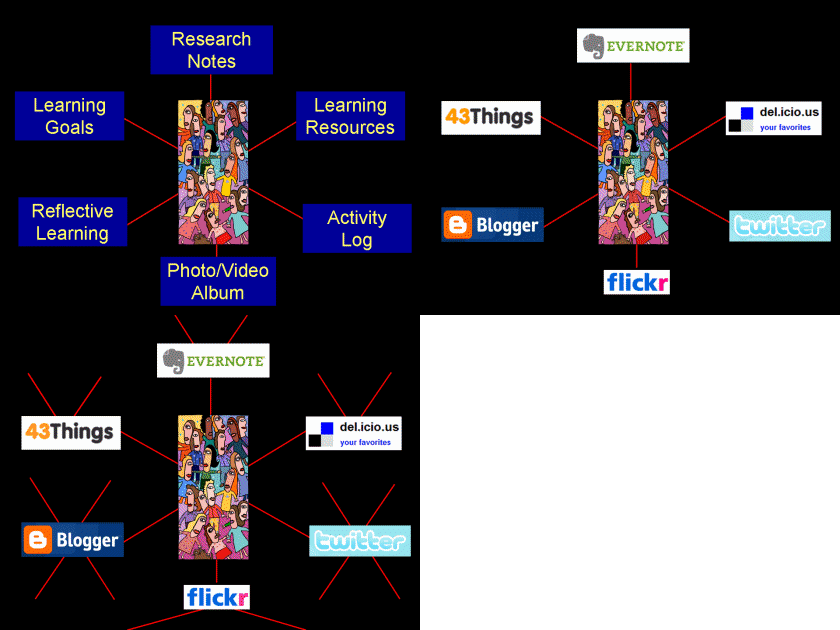
40% of Polytechnic teachers are currently exploring web 2.0 or collaborative web services for learning. Many are using online blogs, photo or video albums for reflective learning or folios for assessment evidence or showcasing work.

The graphic above shows some examples of other web 2.0 services being used by teachers for learning, teaching and assessment. The red lines are indicative of the networks of 'friends' that each service may also bring to the 'classroom' giving an outside audience and increasing the potential for collaboration.

The Flexible Learning Team is now making some recommendations about which particular web service to use for specific learning tasks or desired learning outcomes. This will not only guide those who may be looking for a service to meet their needs but also create a critical mass of users within the organisation that can help each other.

Wednesday, February 24, 2010

Game on for Learning

Panorama of AppV Games on CleVR.com


Today 60 students were playing networked games as part of the Enrichment Program on the Elizabeth Campus thanks to dedicated problem solvers in ICT Services. Simon and Rob (pictured far left and centre - they were moving fast...) used MS Application Virtualisation (App-V) to deploy 60 instances of legal games across normal student networked computers.

The beauty of this is that the games don't affect the other software running on the network or network performance. While playing the games students have no access to the internet and play time can be controlled centrally.

The test run today proved it worked brilliantly! Game-based learning environments have been used on various campuses before for

  • developing literacy, numeracy and communication skills
  • digital story telling
  • machinima (movies made 'in-world')
  • modding (building games using commercial game engines)
  • character design, AI and scripting
  • 3D design and terraforming
  • problem solving and system thinking skills

Today's session was just about fun and the doors had to be closed after the first 60 students arrived leaving many disappointed!

Simon and Rob's work will mean that ICT Shared Services can provide similar engaging learning environments across all campuses into the future.

Thursday, February 11, 2010

Enabling a Learning Commons

Click graphic for full size


Polytechnic Libraries and Learning Centres have been evolving for many years and now bear little resemblance to the traditional libraries that many might remember from twenty years ago.
This evolution is continuing as we plan to meet the needs of tomorrow's learners, teachers and other clients. The Polytechnic Corporate Plan (2009-2010) outlines a 'learning commons' philosophy that further integrates learning and support services for students and facilitates the flexible-applied-connected-supported learning agenda.

In addition the State Library and UTas Library are changing to meet client needs. The national Re-Imagining Libraries Strategic Plan is indicative of the directions many libraries are taking:

"In collaboration, the National, State and Territory Libraries of Australia and New Zealand will become leaders in empowering people to create, discover, use and transform our collections, content and global information resources."

These directions require more open and connected ICT services than has previously. The Polytechnic Library Online Services Project team has been mapping the ICT functionality needed to meet the above agenda.

The above graphic (click for full size) maps the ICT functionality to enable:

  • Information and resources to come into the organisation including Open Education Resources, Open Courseware, RSS feeds... (LHS of graphic)
  • Information and resources produced or added to by students and staff within the organisation including Open Education Resources, Open Courseware and RSS feeds to be shared with others (RHS of graphic)
  • Online access by students and staff within the Polytechnic via normal logon (LDAP) or Open ID (bottom of graphic)
  • External access by school students, mentors, local communities... via open unauthenticated access or Open ID (top of graphic)

These needs will now determine the kinds of systems that will be required. Current ICT systems may or may not be sufficient.

Sunday, February 7, 2010

E-Portfolios for students and staff

E-Portfolios are now ready for anyone in the Polytechnic who wants to use them - staff, classes, groups, individual students... As described before we are using Mahara to provide this service. We have two hosted services arising from different pilot projects in 2009 - one is just Mahara and the other is an integrated Mahara + Moodle installation.

Teacher and user guides (video and text) are available and a community of practice has been established across all campuses. It will be interesting to see how many staff and students decide to use E-Portfolios who were not part of previous projects.

Problems encountered during the 2009 projects will hopefully be addressed with recent changes such as


  • upgrading Internet Explorer 6 to Internet Explorer 8
  • upgrading Mahara to allow for importing and exporting
  • customised help
Mahara isn't the only solution for E-Portfolios. Some staff and students choose to use

A survey of staff at the end of 2009 revealed that 40% were exploring so-called web 2.0 or social media sites for use with students. The attraction of Mahara is that it provides some social media functionality within a local learning environment while still providing student control of access to work including external access via a 'secret' URL.

Students can connect with and share work with classmates or friends as well as teachers and feedback from students in the 2009 projects indicated that this was highly valued.

Tuesday, June 2, 2009

Re-framing the Present

The current restructuring of Tasmanian public post year 10 education provides a good opportunity to re-conceptualise ICT services to match learning needs. A new ICT network infrastructure has been built from the ground up that supports both legacy and new systems across 16 campuses statewide.

Learning priorities have already been re-framed as the FACS Learning Model - Flexible, Applied, Connected and Supported Learning. In what ways can we re-conceptualise ICT services to enable, facilitate and support the FACS Learning Model?

We have already attempted to map a student perspective on current and planned ICT services, and to map the notion of a Virtual Campus. This post attempts yet another map - starting with learning. The learning priorities on the left are linked to the necessary ICT functionality to support them on the right:


Does it show the important ICT functionality required to enable, facilitate and support FACS Learning?

The next part of this mapping exercise emphasises the need for management processes and tools for the learner, the teacher and the institution .

'Manage MyLearning' is about each learner's need to manage all the processes, artifacts, resources, networks... as they continue their learning journey - particularly as the learner becomes more self-directed.

The teacher needs to manage their teaching processes, resources, classes, students, professional networks... Recently some have done this in a Learning Management System (LMS) - which has really been more of Teaching Management System for most.

'Manage MyInstitution' could be seen as the institutions need to manage facilities, services, staff and students... (Or it might be taking the 'My' trend too far...)

Are there other key roles that should be included here that will inform the provision of ICT services?


The next map shows some of the ICT services that might support learners, teachers and the institution. A brief description of each follows...


Folio & Pathway Management Systems: This is about much more than the provision of efolios. It is about each learner managing their own learning choices, resources, artifacts, networks... on their learning journey (pathway). The learner has control over who can view, access and share their learning resources and artifacts.

Learning Management Systems: This is the standard LMS functionality which is mostly about teacher structures and controls to support learning, teaching and assessment.

Information Management Systems: This is largely about managing and communicating institutional information and resources. Systems such as MOSS have evolved to integrate greater functionality however this requires authenticated access to a closed system.

Learning Environments: These include spaces and structures such as virtual worlds, simulations, serious games, augmented reality... Some of these can integrate resources and functionality from other management systems - eg Sloodle.

Virtual Learning Commons: This is the online component of the 'Learning Commons' that includes additional services to learning resource access such as learning support, client services and exhibition spaces.

Shared Services Management Systems: Finance, Facilities, Human Resources and much more.

Learning and Business Applications & Web Services: Office, specialist and learning tool software and web services. Includes application deployment.

Research & Project Management Systems: This has been somewhat ad-hoc in the past and could evolve to support collaborative innovation and research within and beyond the institution.

Course Management Systems: This could evolve beyond the management of in-house courses to the provision of access to Open Courseware.

What other key ICT services are required to support FACS learning?

Still missing from this mapping exercise are the range of services - including some of the management services above - that exist beyond the institution.


The full map can be seen here.

.